How to Cut Your Meta Ads Cost Per Purchase Without Reducing Your Budget
 8 Aug 20267 min read
The instinct when Meta ads get expensive is to cut the budget. This is almost always the wrong move. Cutting the budget reduces the algorithm's ability to find buyers, further degrades performance, and typically results in the same or higher cost per purchase on a smaller spend. The right move is to find and fix the specific things driving the cost up without touching the budget at all.

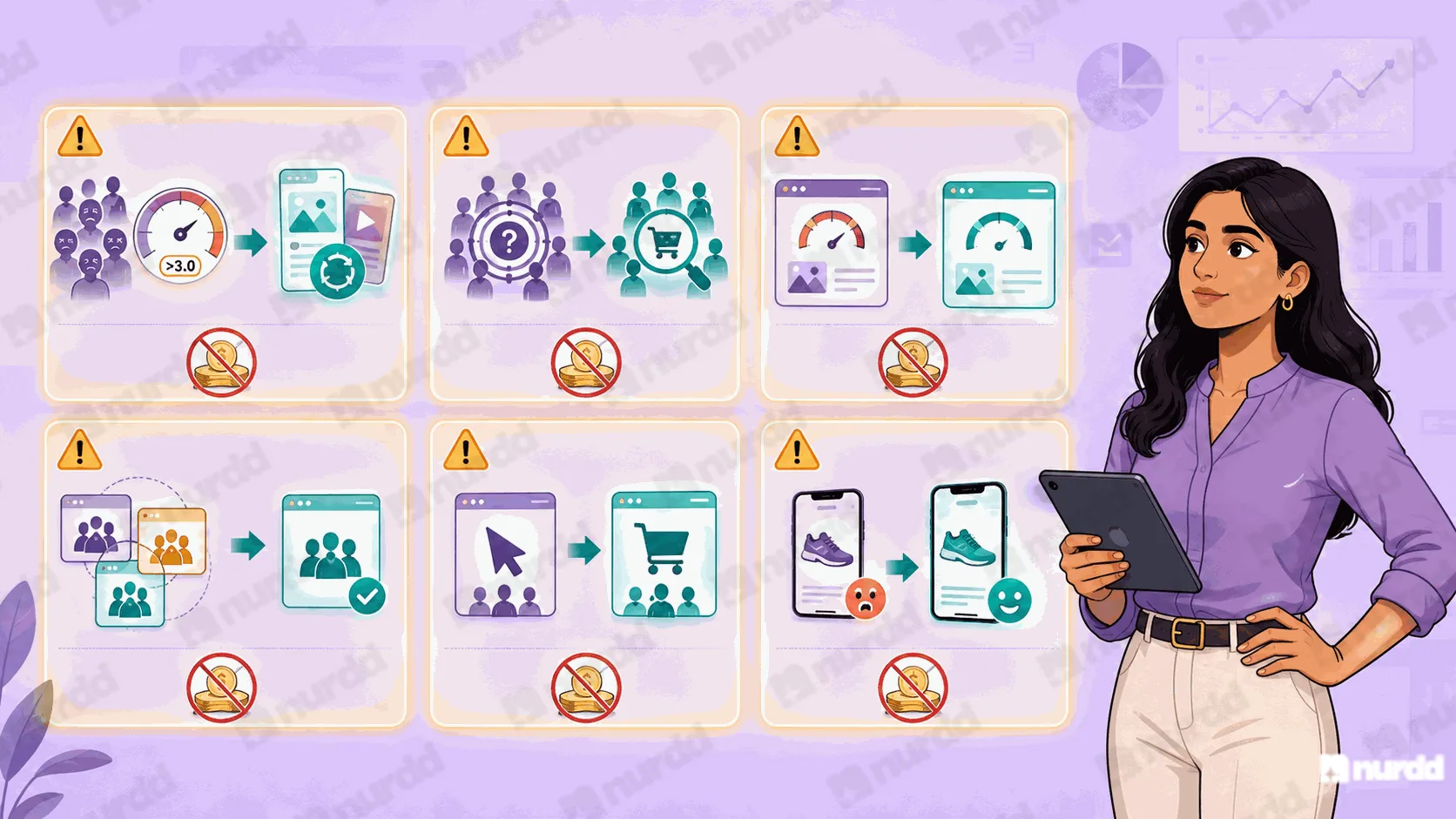
The Six Most Common Reasons Meta CPP Is High
1. Audience Fatigue
When the same audience has seen the same creative too many times, engagement drops, the algorithm raises your effective CPM to compensate, and cost per purchase rises. Check frequency at the ad set level. If cold audience frequency is above 3.0 over seven days, introduce new creative immediately.
2. Broad Audience With No Purchase Signal
If your campaign is targeting a very broad audience interest targeting with 50+ million people without enough purchase event history for the algorithm to narrow its focus, you are paying for an enormous amount of irrelevant reach. Add Custom Audiences of past purchasers and use them to seed Lookalike Audiences. This gives the algorithm a proven buyer profile to optimise toward.
3. Landing Page Experience Score Below Average
Meta measures how useful your landing page is to people who click your ad. A landing page that loads slowly, does not match the ad's promise, or has a high bounce rate gets penalised with higher CPMs. Check your landing page experience score in the Ads Manager delivery column.
4. Too Many Ad Sets Competing for the Same Audience
If you have multiple ad sets targeting overlapping audiences in the same campaign, they are bidding against each other in Meta's auction. This inflates your effective CPM. Use Meta's Audience Overlap tool to identify and consolidate overlapping ad sets.
5. Wrong Campaign Objective
A campaign optimising for Link Clicks will find people who click. A campaign optimising for Purchases will find people who buy. If you are running Link Click or Traffic campaigns for a conversion goal, you are paying for the wrong behaviour. Switch to Purchase conversion objective.
6. Weak Creative-to-Landing Page Match
If your ad shows a product in one context and the landing page presents it in a completely different context, the customer's expectation is disrupted at the most critical moment. Match the visual, the message, and the specific product shown in the ad to what they see when they land.
The Quickest Fix to Test This Week
Duplicate your highest-spending ad set. On the duplicate, add a Lookalike Audience built from your last 180 days of purchasers. Run both for seven days at equal budget. The Lookalike version will almost always deliver a lower CPP because it is working from a proven buyer signal rather than broad interest targeting.
Simultaneously, add new creative to your highest-frequency campaign. Do not change the audience or budget just add two new video or image variants. New creative resets the frequency curve and typically reduces CPP by 15 to 25 percent within the first week.
How Pulse Identifies the Cause
Pulse analyses your Meta account across all six drivers simultaneously and tells you which specific one is causing your elevated CPP. Instead of testing changes one at a time and waiting a week for each result, Pulse shows you the diagnosis upfront so you can fix the right thing first.
“Cutting your Meta budget when CPP is high is like turning off the engine when the car is overheating. The problem is not the fuel. Find the leak first.”
Sources & References
Meta Business (2025) – Campaign Performance Optimisation Guide | business.meta.com
AdEspresso (2025) – Meta Ads CPP Benchmarks by Category India | adespresso.com/blog
Social Media Examiner (2025) – Reducing Facebook Ads Cost Without Cutting Budget | socialmediaexaminer.com
Pulse, Nurdd (2026) – Meta CPP Reduction Playbook: Indian D2C Brands | nurdd.club/blogs

Your ads are spending. Are they actually performing?
Pulse connects to Google Ads and Meta Ads to explain performance in plain language, diagnose what changed, and recommend specific actions — no data analyst needed.