Why Your Google Shopping Ads Are Showing for the Wrong Products (And Bleeding Your Budget)
 11 Jun 20266 min read
Google Shopping matches products based on feed relevance, bids and expected click-through rate, not your margins, inventory or product-level conversion rates. Review search terms, add negatives for irrelevant queries, adjust bids by product performance and improve feed titles.
A D2C brand running Google Shopping campaigns spent three months wondering why their best-selling product was getting clicks but zero conversions. Their second-best seller was barely getting impressions. Their budget was burning through Rs.40,000 a month with a ROAS of 1.2.
When they pulled the search term reports, the answer was immediately visible: their hero product was showing up for generic category searches with high competition and low commercial intent. Meanwhile, the product best suited to high-intent searches was buried because Google had assigned it the wrong bid priority.
This is not an unusual situation. It is the norm for Shopping campaigns that have not been actively managed.

Why Shopping campaigns go wrong by default
Google Shopping campaigns are automated in a way that feels helpful but consistently produces suboptimal outcomes without active oversight.
Google decides which product to show for which search query based on its own interpretation of your product feed, your bids, and the searcher's behaviour. It is not making these decisions with your margin structure, your inventory, or your conversion rate by product in mind. It is making them based on relevance signals and expected click-through rates.
The result is that high-impression products crowd out high-margin products. Broad-category searches get budget that should go to specific high-intent queries. And the products you most want to sell are often the ones getting the least exposure.
The search term report is the single most important report you are probably ignoring
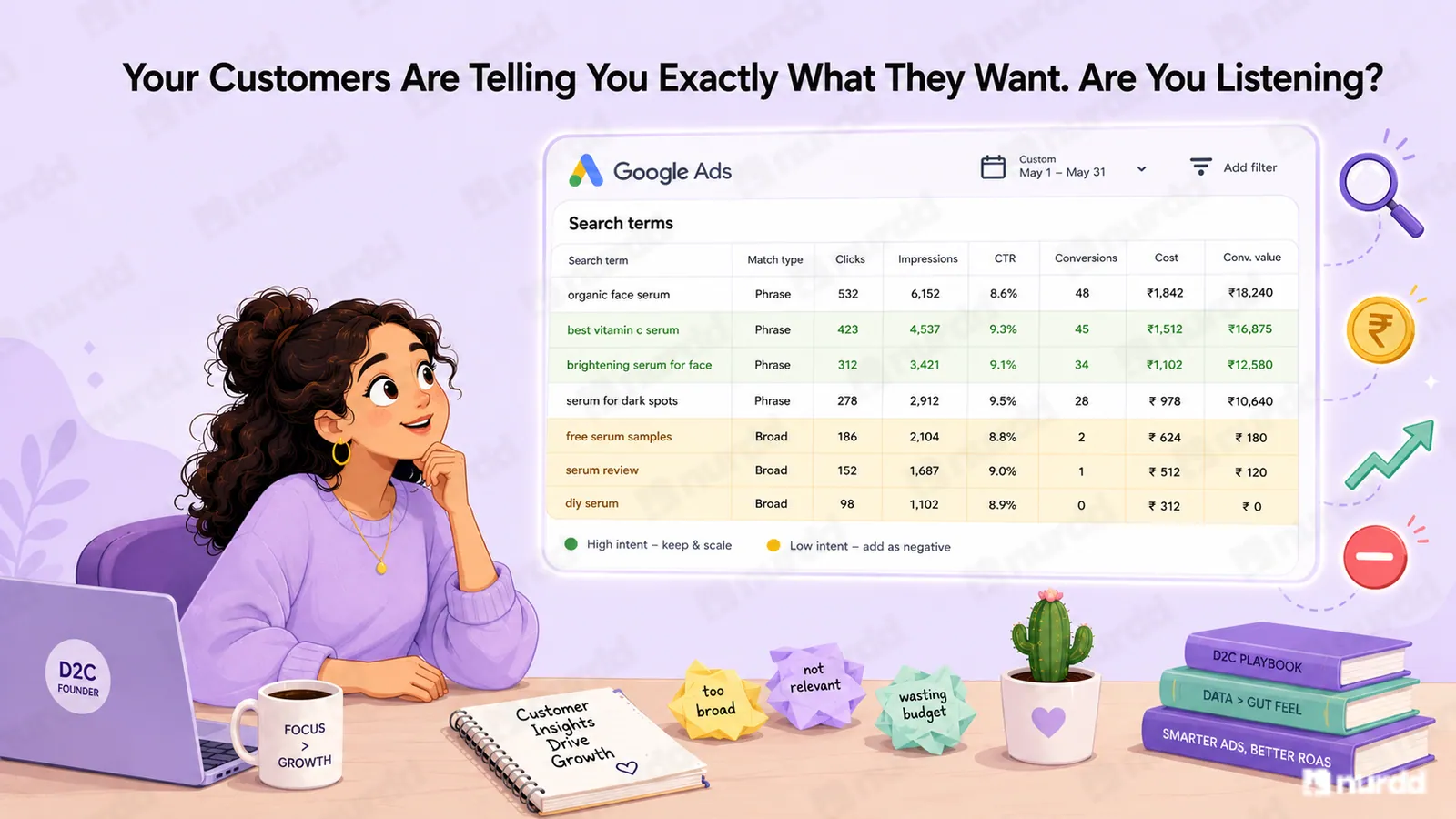
Pull the search term report for your Shopping campaign from the last 30 days. Look at what actual queries are triggering your ads.
You will almost certainly find three categories of problem queries. First, queries with zero commercial intent: people researching the category, looking for information, comparing products without intent to buy today.
Second, queries for products you do not sell: competitors' brand names, product types outside your range, discontinued items.
Third, queries that are too broad to convert well: "buy shoes online" instead of "men's white leather sneakers size 10." Your ad shows, costs money, and loses to someone with a bigger budget and a more relevant product.

The fixes that actually move the needle
Negative keywords are the first and most urgent fix. Every query in the search term report that has generated clicks with zero conversions over a meaningful spend threshold should be added as a negative keyword. This is a weekly hygiene habit for Shopping campaigns, not a one-time task.
Product-level bidding is the second. Most brands set uniform bids across their entire product catalogue. This is almost always wrong. Your highest-margin products should have higher bids. Products with proven conversion rates should get more budget.
Product feed quality is the third. The title structure of your product feed items determines which queries Google matches to them. A product titled "Face Wash 200ml Blue Bottle" will match to different queries than one titled "Salicylic Acid Face Wash for Acne-Prone Skin 200ml." The second title contains the terms your buyer is actually searching for.
How to know if your campaign is actually healthy
A healthy Shopping campaign has a search term report where the majority of high-spend queries are recognisably aligned with purchase intent for your actual products. It has a negative keyword list that grows by 20 to 30 terms per month as the team reviews what is triggering ads.
If you have not looked at your search term report in the last two weeks, you are almost certainly funding queries that are not working.
A Google Shopping campaign that has never been optimised is not running on autopilot. It is running without a driver.

Sources & References
Google Ads Help: Shopping Campaign Optimisation — https://support.google.com/google-ads/answer/9443907
Tinuiti: Google Shopping Benchmark Report 2024 — https://tinuiti.com/blog/paid-search/google-shopping-ads/
Search Engine Land: Product Feed Best Practices 2024 — https://searchengineland.com/google-shopping-feed-optimization-tips-388513
WordStream: Google Shopping Ads Optimisation Guide — https://www.wordstream.com/blog/ws/2019/08/14/google-shopping-ads

Your ads are spending. Are they actually performing?
Pulse connects to Google Ads and Meta Ads to explain performance in plain language, diagnose what changed, and recommend specific actions — no data analyst needed.