How to Audit Your Google Ads Account in 30 Minutes and Find the Budget You Did Not Know You Were Losing
 10 Sept 20266 min read
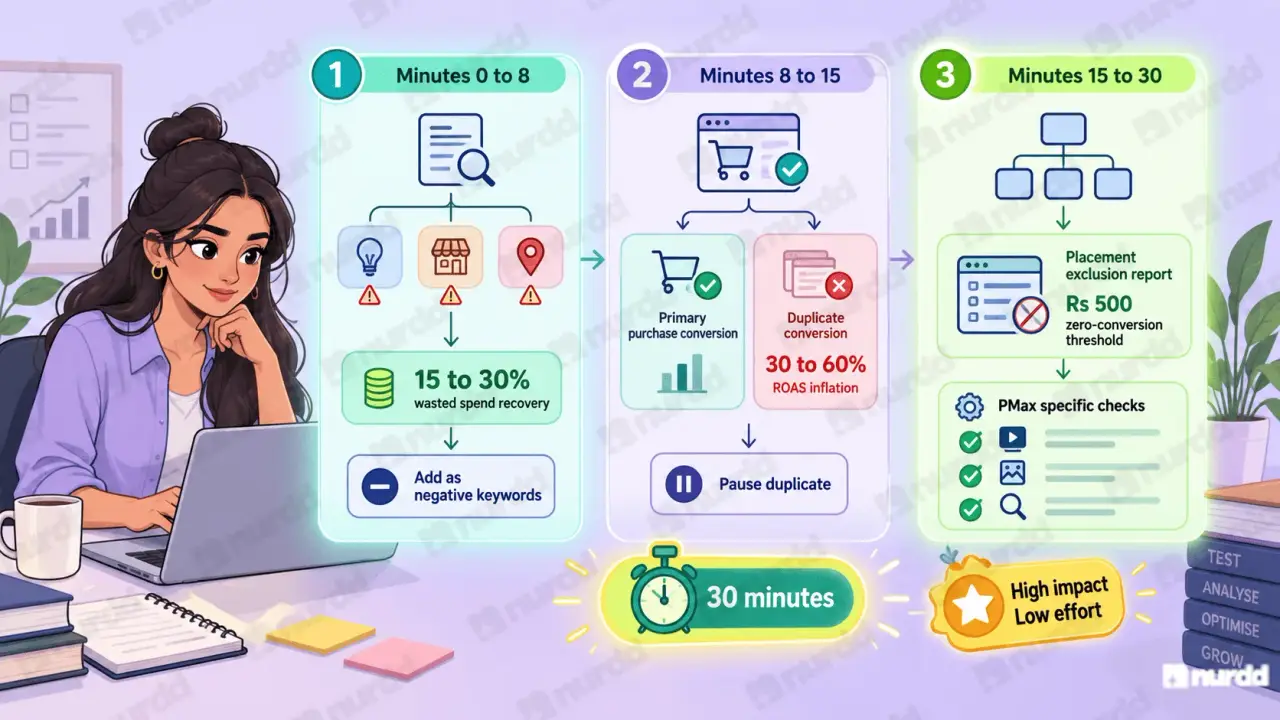
Start with the Search Terms report sorted by cost and flag every term you would not have chosen to bid on — it is the highest-value check in the audit. Thirty minutes across search terms, campaign structure, negative keywords and conversion setup typically surfaces waste worth 15 to 30% of monthly spend.
Most D2C founders look at Google Ads once a month, see a ROAS number, feel okay or anxious, and close the tab. The ROAS number tells you almost nothing about whether the account is well-managed. A 30-minute audit tells you everything and for most unaudited accounts, it finds wasted budget equal to 15 to 30% of monthly spend.
Minutes 0 to 8

Check Your Search Terms Report
The highest-value check in the audit. Go to Keywords in the left navigation, then Search Terms. Sort by Cost descending. Read the top 40 to 50 search terms by spend.
Flag every term in these three categories:
Informational queries: how to make protein powder at home, what is niacinamide used for. These are research queries from people not ready to buy. They cost money and convert at near zero.
Competitor branded terms: searches including a competitor's brand name. These often appear in broad match campaigns and convert poorly for your brand.
Geographic or demographic mismatches: searches including locations or demographics outside your target market.
Add up the spend on all flagged search terms. In most unaudited accounts, this is 15 to 30% of total monthly Search campaign spend. Add all flagged terms as negative keywords immediately. This is the fastest budget recovery in Google Ads.
Minutes 8 to 15
Check Your Conversion Tracking Setup
Go to Tools, then Conversions. Review every conversion action in your account.
Your primary conversion should be: Purchase tracked at the actual Shopify checkout completion step. Not Add to Cart, not Page View. Smart Bidding uses your primary conversion signal to decide where to bid aggressively. Wrong signal = wrong auctions at wrong prices.
The duplicate conversion problem: Check whether Purchase appears twice in your Conversions table both a Shopify native conversion and a Google Tag Manager purchase event. Duplicate conversions inflate reported conversion counts by 30 to 60%. Your reported ROAS is correspondingly inflated. Pause the duplicate immediately and let the algorithm recalibrate over the following 2 to 3 weeks.
Minutes 15 to 30
Check Campaign Structure and Placements
Campaign structure: Each campaign should have a clear, distinct purpose branded search, non-branded category search, Shopping, and remarketing as separate campaigns.
If branded and non-branded keywords are in the same campaign, separate them today. When mixed, Smart Bidding allocates budget toward branded terms (which always show higher conversion probability) at the expense of non-branded prospecting.
Placement exclusions: For Display or Performance Max campaigns, open the Placement Report. Sort by spend descending. For every placement with spend above Rs 500 and zero conversions this month, add it to your exclusion list.
Three Performance Max-specific checks:
Check Asset Group performance labels (Best, Good, Low) remove creative assets from Low-labelled groups.
Check the Search Terms Insight report within PMax reveals whether it is spending on irrelevant query themes.
Confirm you have brand keyword exclusions in PMax without them, PMax will compete against your own branded Search campaigns in auction, inflating CPCs across your own account.
Fix this week — high impact, low effort:
Add search term negatives for all flagged queries-30 minutes
Pause duplicate conversion tracking-5 minutes
Add brand keyword exclusions to Performance Max-15 minutes
The Recurring Audit Habit
Monthly Reviews That Prevent Problems From Accumulating
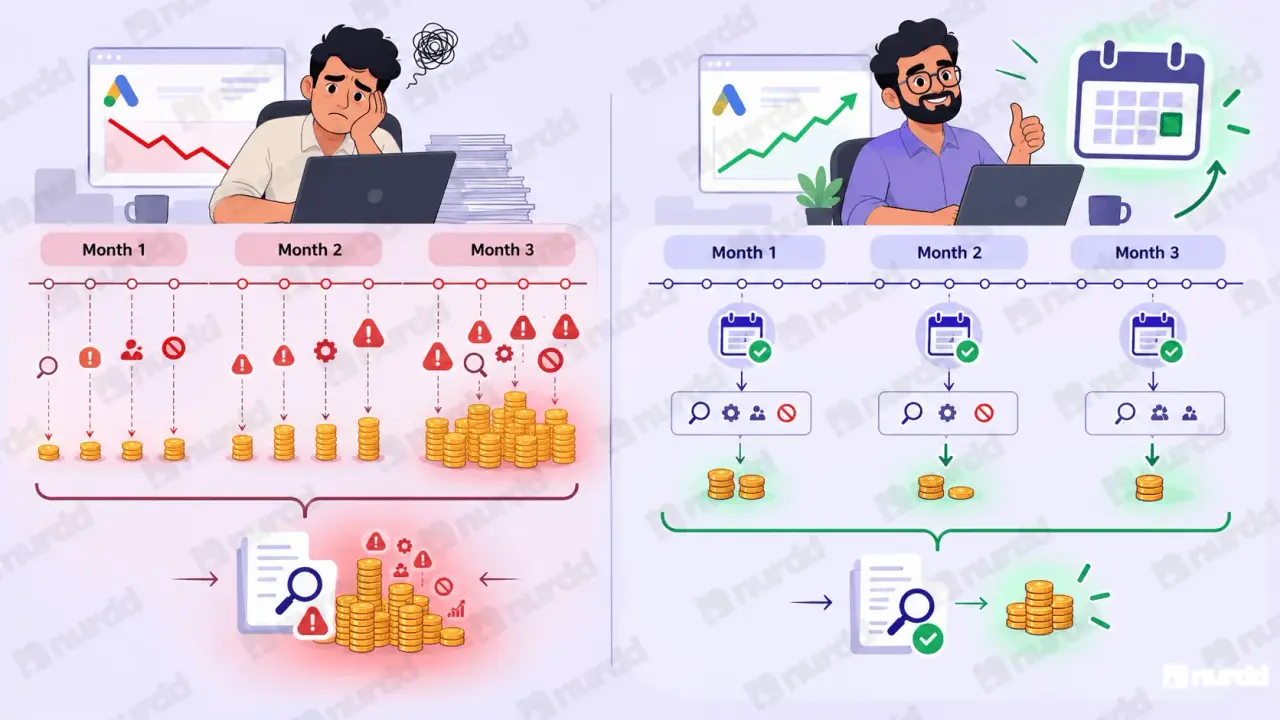
The one-time audit finds the issues that accumulated over months of unreviewed account activity. The recurring audit prevents those issues from accumulating in the first place.
Schedule a 30-minute Google Ads account review on the last Friday of every month. The monthly version is shorter than the initial audit because you are checking for new issues since the last review, not diagnosing an unreviewed account.
With consistent monthly reviews, the average issue identified per session drops significantly over time — not because issues stop occurring, but because they are caught within weeks of appearing rather than after months of budget waste.
"The 30-minute audit does not fix your Google Ads. It shows you exactly what is broken. That is the harder thing to find — and the more valuable."
Sources and References
Google Ads Help – About the search terms report
Google Ads Help – About conversion tracking
Google Ads Help – About Performance Max campaigns
WordStream – The Most Common Google Ads Mistakes
Nurdd / Pulse – Google Ads auditing resources for Indian D2C brands

Your ads are spending. Are they actually performing?
Pulse connects to Google Ads and Meta Ads to explain performance in plain language, diagnose what changed, and recommend specific actions — no data analyst needed.