AI Search Visibility
Google AI Overview Tracking in Search Console: What It Shows
Search Console's Generative AI report counts AI Overview and AI Mode impressions, not clicks or answers. Here is what it shows and what fills the gap.
 Sheetal Shakshi17 Nov 202614 min read

Search Console can track Google AI Overviews only as exposure: its Generative AI performance report shows impressions for your pages in AI Overviews and AI Mode by page, country, device and date. It shows no clicks, no queries and no answer text. To measure click impact, compare your own CTR on queries with and without an AI Overview; to see whether AI engines name your brand, use an answer-level tracker such as Noma.
Google AI Overview tracking in Search Console is possible only in part. Since 2026, Search Console has a Generative AI performance report that shows impressions for your pages in AI Overviews and AI Mode, but it shows no clicks, no queries and no split between the two features. It cannot tell you what an AI answer actually said about your brand.
Key takeaways
- Search Console now has a dedicated Generative AI report under Performance, with impressions by page, country, device and date.
- The report does not show clicks or queries, and AI Overviews and AI Mode are combined, so it cannot measure click loss on its own.
- Measure click impact by comparing your own Web-search CTR on queries that trigger an AI Overview against queries that do not.
- Search Console never shows what an answer says about you, whether you are named, or which competitors appear. That needs an answer-level tracker.
- Use three layers: exposure in Search Console, outcomes in Search Console and analytics, and answers in a dedicated tracker.
What does Search Console actually show about AI Overviews?
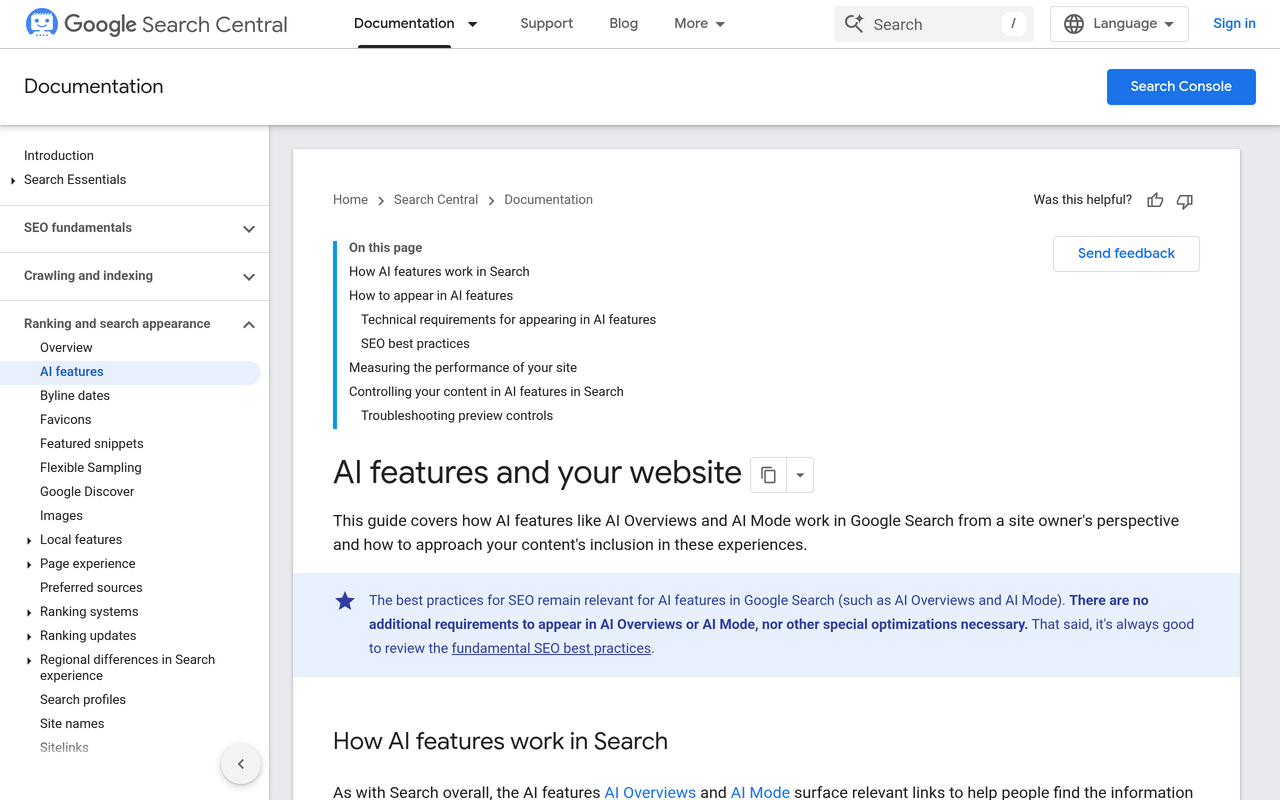
Search Console shows two things about AI Overviews, and they sit in different places. The older place is the standard Performance report. Google's documentation states that sites appearing in AI features such as AI Overviews and AI Mode are included in overall search traffic and are reported in the Performance report within the "Web" search type (Google Search Central, AI features and your website). That means AI impressions and clicks are mixed into your ordinary numbers with no filter to isolate them.
The newer place is the Generative AI performance report. Google introduced it on 3 June 2026, and Search Engine Journal, August 2026 reports Google's note that it had rolled out to all websites worldwide as of August 31, 2026. Google's help page says the report covers impressions from AI Overviews and AI Mode, and lets you group them by page, country, date and device (Google Search Console Help, Generative AI performance report).
Two details from that help page matter for reporting. The Pages dimension groups data by the final URL linked by a generative AI feature, normally assigned to the canonical URL. The report also says Search Console does not include data from experiments in Search Labs.
A direct definition
Google AI Overview tracking in Search Console means reading the Generative AI performance report, which counts how many times links to your site were shown in AI Overviews and AI Mode. It is a measure of exposure by page, not a record of answers, citations in context or clicks.
Can I track Google AI Overviews in Search Console?
Yes, for exposure. No, for the answer itself. Search Console can tell you which of your pages were shown as links in Google's AI features and whether that count is rising. It cannot tell you which query triggered the Overview, what the Overview said, or whether your brand was named in the text.
The published coverage of the new report is consistent on its limits. AI Peekaboo describes it as counting impressions only, combining both features, and showing no queries or clicks. Search Engine Journal, in the August 2026 article above, likewise notes that it does not include click data as of publication.
What it shows and what it hides
| Question you want answered | Search Console Generative AI report | Standard Performance report (Web) |
|---|---|---|
| Did my pages appear as links in AI Overviews or AI Mode? | Yes, as impressions by page | Mixed into totals, no filter |
| Which page appears most? | Yes, Pages tab | Only for all Web results |
| Which feature showed it, Overview or AI Mode? | No, combined | No |
| Which query triggered it? | No | Query data exists, but cannot be isolated to AI |
| Did anyone click? | No click data | Clicks counted as normal Web clicks |
| Does the answer name my brand? | No | No |
| Which competitors are named instead? | No | No |
| Is ChatGPT, Gemini, Perplexity or Claude mentioning me? | No, Google only | No, Google only |
The report is also an impression count with its own rules. Per AI Peekaboo, two of your pages in the same generative feature count as one impression in the chart total, while the Pages table counts each page separately, so table rows can add up to more than the chart. The table also stops at 1,000 rows, like the normal Performance report.
Why does this gap matter for marketers?
It matters because the decisions people want to make need three kinds of evidence, and Search Console supplies one. Budget owners ask whether AI answers are taking traffic. Content teams ask which pages to change. Brand teams ask whether the company is recommended at all. An impression count answers none of those directly.
There is also a counting rule to keep in mind. In an experiment, Brodie Clark Consulting notes that Google clarified in August 2024 that a link must be scrolled or expanded into view to count as an AI Overview impression. So an impression is not the same as an Overview that appeared at the top of the page. A page can be cited and still log no impression if the link was never revealed.
The click question is contested
Public studies disagree on how big the effect is, which is why you should measure your own. The Pew Research Center study, summarised by SISTRIX, 2025, found about 15% of searches without an AI Overview led to an organic click, against around 8% with one. Links inside the Overview were clicked in only about 1% of cases. Google disputed the Pew findings, as reported by PPC Land, 2025.
Ahrefs published a different measure. Its blog states that AI Overviews reduce clicks by 34.5% (Ahrefs), and its tracker page says a re-run on December 2025 data correlates an AI Overview with a 58% lower clickthrough rate for the top-ranking page (Ahrefs, AI Overviews tracker). Search Engine Land reported the 34.5% figure as a position 1 CTR drop across 300,000 keywords. These are correlations on specific keyword sets, not forecasts for your site.
How do I measure AI Overview impact on clicks?
You measure it by comparison, not by a single report. Because Search Console does not tag clicks as AI or non-AI, the reliable approach is to split your own queries into those that show an AI Overview and those that do not, then compare click-through rate and click trends over the same dates. The steps below use Search Console, a manual or tool-based check, and analytics.
Checklist: a six-step click-impact test
- Export a query set. In Performance, Search results, Web, export queries and pages for a stable 90-day window. Action: take your top 200 queries by impressions. Result: a baseline list. Why: you need fixed queries to compare against.
- Label each query. Search each query on a clean browser session and mark whether an AI Overview appears. Action: record yes, no or sometimes. Result: two cohorts. Why: Search Console has no AI filter, so the label has to come from outside it. See which queries trigger Google AI Overviews.
- Match the cohorts. Compare queries with similar average position and intent. Action: pair one AI query with one non-AI query at a similar position. Result: fairer pairs. Why: position drives CTR more than anything else, and mismatched pairs mislead.
- Compare CTR and clicks. Action: calculate CTR per cohort for the same weeks. Result: a gap between cohorts. Why: that gap is a rough estimate of the effect on your site, not a causal proof.
- Add the Generative AI report. Action: open Performance, Generative AI, Pages. Result: a list of pages with AI impressions. Why: this shows which pages had links revealed in AI features, which you can overlay on the cohorts.
- Check landing-page quality in analytics. Action: compare engagement for the same landing pages in your analytics tool. Result: a view of whether the remaining visitors are more engaged. Why: Google Search Central says clicks from pages with AI Overviews are higher quality, so volume alone is not the full story. See how to measure AI referral traffic in analytics.
Worked example with published rates
This is arithmetic on published figures, not Nurdd data. Pew's rates, as reported by SISTRIX, were about 15% without an AI Overview and about 8% with one. Take 1,000 searches. At 15%, that is 150 organic clicks; at 8%, it is 80. The difference is 70 clicks, which is a 46.7% relative reduction, the figure Search Engine Journal reported for the same study in Search Engine Journal, 2025.
Now swap in your own cohort rates from step four. If your AI cohort CTR and non-AI cohort CTR are close at matched positions, the effect on your site may be small. If they differ widely, that is your priority list. Do the maths with your numbers rather than borrowing Pew's, because Pew tracked a specific group of US adults, as Pepper, 2026 summarises, not your keywords.
How does Google AI Overview tracking work with a dedicated tracker?
A dedicated tracker works from the opposite end. Instead of counting what Google logged against your site, it asks the questions your customers ask and records the answers. That produces the answer-level view: whether your brand is named, how it is described, which sources are cited and which competitors appear.
Noma tracks 13 AI engines, including ChatGPT, Gemini, Perplexity and Claude, and records whether a brand is named and which page each citation comes from. That is the evidence Search Console cannot provide. For setup detail on prompt choice, see which prompts to track.
A decision table: which tool answers which question
| Decision | Evidence you need | Where to get it |
|---|---|---|
| Are my pages exposed in Google AI features? | Impressions by page and date | Search Console Generative AI report |
| Am I losing clicks on some queries? | CTR by cohort, matched by position | Search Console Performance plus manual or tool labelling |
| Is my brand recommended in the answer? | Named mention in answer text | Answer-level tracker such as Noma |
| Who is cited instead of me? | Competitor and source lists per prompt | Answer-level tracker |
| Is ChatGPT or Perplexity naming me? | Cross-engine answers | Multi-engine tracker, not Search Console |
| Did a content change help? | Before and after answers on a fixed prompt set | Tracker plus a GEO experiment design |
Where does Noma fit?
Noma by Nurdd (nomahq.app) is an AI search visibility dashboard that tracks whether a brand appears in answers from 13 AI engines, including ChatGPT, Gemini, Perplexity and Claude, polled daily. It shows citation frequency by category, competitor comparison and recommendations for improving visibility. It belongs next to Search Console because it covers the answer-level view that Google's own report leaves out.
Book a demo at https://www.nurdd.club/demo and we will show you your own brand's answer-level view: the prompts your category asks, whether your brand is named, and which pages are cited, beside the Search Console exposure you already have.
Noma also has a 3-day free trial. A card is taken at signup and billing starts on day 3, with no charge if you cancel before then. To plan what to check in those days, use the 3-day trial test plan. For tool choices more broadly, see the comparison of AI search visibility tools.
How do Search Console, Performance reports and trackers compare?
The three sources answer different questions and should not be merged into one number. Search Console is first-party, free and measures Google only. A tracker is third-party and answers-based, so it samples responses instead of counting real searches. Both facts matter when you read the numbers.
| Dimension | Search Console Generative AI report | Search Console Web Performance | Noma |
|---|---|---|---|
| Unit | Impressions of links | Impressions, clicks, CTR, position | Answers and citations |
| Engines | Google AI Overviews and AI Mode | Google Search | 13 AI engines |
| Brand named in text | Not shown | Not shown | Recorded |
| Competitor view | None | None | Competitor comparison |
| Real user volume | Yes, Google's own counts | Yes | Sampled prompts, not user counts |
| Cadence | Days, weeks or months | Daily data | Polled daily |
That last point is a trade-off: a tracker's prompt panel is a sample of what people might ask. Check how any tool collects its data, as covered in how to verify AI search tool data, and see manual prompts versus software for when spreadsheets stop scaling.
What are common mistakes when tracking AI Overviews?
- Treating AI impressions as traffic. They are exposures. Without click data in the report, they do not show visits.
- Reading AI Mode and AI Overviews as one thing. The report combines them. If you need to decide whether to watch both, read Google AI Mode vs AI Overviews.
- Assuming an impression means a named mention. A link can be shown without the brand appearing in the written answer.
- Comparing mismatched queries. Brand queries and long informational queries have different CTR curves.
- Ignoring other engines. Search Console covers Google only, so ChatGPT, Perplexity and Claude exposure is invisible to it.
- Opting out without measuring. The SEJ article notes a property-level Search generative AI control exists in Settings that excludes your links and content from the same surfaces, meaning no traffic or impressions from them. Measure first.

What are examples of using both views together?
These are scenarios, not customer cases. They show how the layers combine.
An ecommerce marketer sees AI impressions rising but sessions flat
The Generative AI report shows a category page gaining impressions. Organic sessions are flat. The marketer runs the six-step test and finds AI-labelled queries sit at similar positions but lower CTR. Then an answer-level tracker shows the brand is cited but not named in the text, which points to rewriting the page's opening answer.
An SEO lead has to report to a CFO
The SEO lead needs one page. Exposure comes from Search Console, outcomes from the cohort comparison, and answers from a tracker. The structure follows the monthly AI search metrics report, with share of voice added using the method in AI search share of voice.
An agency owner covers several clients
Each client has its own Search Console property, so each gets its own Generative AI report where available. The agency adds a tracker so every client has the same answer-level metrics.
How is this different from GEO, AEO and classic SEO reporting?
Search Console is a classic SEO instrument that has gained an AI exposure report. GEO and AEO work is the practice of improving how answer engines describe and cite you, which needs answer-level data. What is generative engine optimization defines the terms, and AI search metrics vs SEO metrics explains what to report together.
Google's own documentation says you do not need special files, AI text files or markup to appear in these features, and no special schema.org structured data is required (Google Search Central). That makes measurement the lever: you cannot fix what you cannot see.
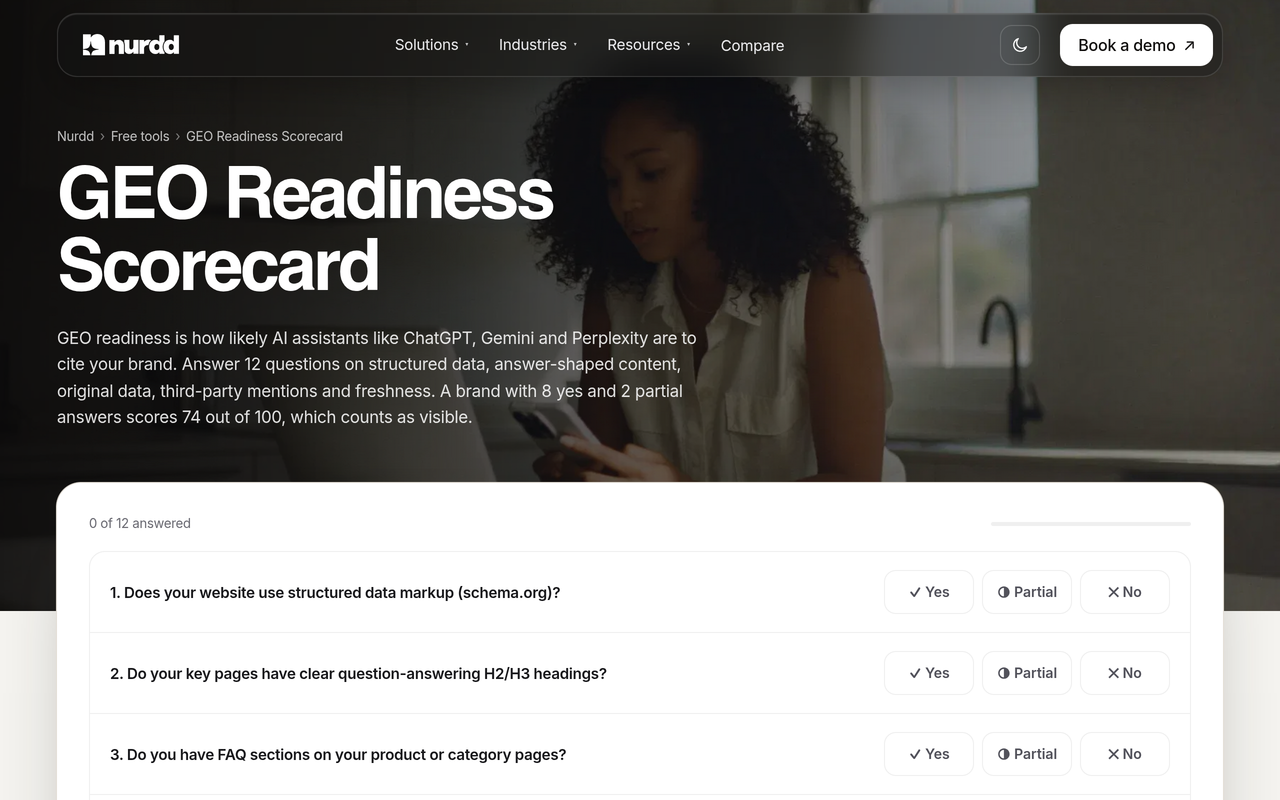
Before you buy anything, run the free GEO readiness scorecard to see how ready your pages are for AI answers.
What should you do this week?
- Open Performance in Search Console and look for the Generative AI report. If it is missing, Google's help page says the site usually has not received enough impressions in generative AI features.
- Export the Pages tab and mark your five most commercial URLs.
- Run the six-step cohort test on your top 200 queries.
- Pick 20 customer questions and record the answers manually, using a 7-step citations audit.
- Decide whether the manual process is already too slow, then trial a tracker.
If you want the answer-level layer without building it yourself, our team also runs it as a service: see our answer engine optimization agency page. For how the products connect, see how Nurdd works.
See your own answer-level view
Search Console tells you where Google showed your links. Noma shows what 13 AI engines say about your brand. In a demo you will see your brand's mentions and citations for your category prompts, with competitors alongside. Book a demo at nurdd.club/demo.
How we researched this
We reviewed Google's own documentation and Search Console help pages, trade-press coverage of the Generative AI performance report, an independent experiment on how AI Overview impressions are counted, and published click-through studies. We also read the top-ranking articles on this topic to see what they cover and leave out. All sources were checked on the publication date, November 2026. We did not run hands-on tests of Search Console for this article, and the worked example uses published figures only. Features change, so confirm the current help pages for your property.
Frequently asked questions
Can I track Google AI Overviews in Search Console?
Partly. The Generative AI performance report shows impressions for your pages in AI Overviews and AI Mode by page, country, device and date. It does not show clicks or queries, and it does not separate the two features.
Why can't I see the Generative AI report in my property?
Google's help page says this usually happens when your site has not received enough impressions in generative AI features. It may also be because you excluded your site from Search generative AI features. Google says the rollout reached all websites worldwide as of August 31, 2026.
Do AI Overview clicks show up in Search Console?
Per Google's documentation, traffic from AI features is reported in the Performance report within the Web search type. There is no filter that separates AI Overview clicks from other Web clicks, so you infer impact by comparing query cohorts.
How do I measure AI Overview impact on clicks?
Label your top queries by whether an AI Overview appears, match them by position, and compare CTR and click trends over the same dates. Add landing-page engagement from your analytics tool. Treat the gap as an estimate, not proof.
Does being cited in an AI Overview count as an impression?
Not always. Brodie Clark notes that Google clarified a link must be scrolled or expanded into view to count. A citation that is never revealed may log no impression.
Does Search Console show whether my brand is named in the answer?
No. It reports link impressions, not answer text. To see whether your brand is named, which sources are cited and which competitors appear, you need manual checks or an answer-level tracker such as Noma.
Does Search Console cover ChatGPT, Perplexity or Claude?
No. It covers Google Search only. Noma tracks 13 AI engines, including ChatGPT, Gemini, Perplexity and Claude, so it fills that gap.
Should I opt out of AI Overviews after seeing the report?
Measure first. Search Engine Journal reports that the opt-out control excludes your links and content from AI Overviews, AI Mode and Discover generative features, so you get no traffic or impressions from them. Decide using your cohort test, not impressions alone.