Paid Media
Agentic Ad Spend Guardrails for Meta and Google Ads
Set budget caps, alerts and approval rules in the platforms, then watch both channels together before an AI agent is allowed to change spend.
 Simran Rawat15 Nov 202616 min read

Agentic ad spend guardrails are limits that sit outside the AI agent: platform budget caps, per-change size limits, approval rules, alerts and a cross-platform review. Start the agent read-only, cap it below normal spend, and enforce limits in Meta and Google Ads themselves, because an agent cannot be trusted to police its own ceiling.
Agentic ad spend guardrails are the limits you set outside an AI agent so it can change budgets on Meta and Google Ads without overspending: hard caps enforced in the ad platforms, a maximum size for each change, human approval for risky moves, alerts on pacing, and a weekly review across both channels. Set them before the agent gets write access, not after the first bad day.
Key takeaways
- Put the hard ceiling in the ad platform (account spending limit on Meta, budget and billing settings on Google), not in the agent's own instructions.
- Google can spend up to twice an average daily budget on a given day, so a daily budget is a pacing tool, not a spending ceiling.
- Start the agent read-only for a few days, then widen permissions one action type at a time.
- Limit each change by size and frequency so the agent does not keep resetting Meta's learning phase or whipsawing Google bids.
- Judge the agent against blended results across Meta and Google, because a budget shift can look like a win on one dashboard and a loss on the other.
- Write down who gets each alert, who can pause, and how fast. A guardrail with no owner is a log line.
Why are guardrails harder when an AI agent controls spend?
A human buyer changes a few budgets a day and remembers why. An agent can make dozens of changes before lunch, across two platforms, with no memory of the policy you had in your head. The risk is not that the agent is malicious. It is that it optimises one number inside one platform while the real constraint, your margin and your monthly budget, sits somewhere it cannot see.
Vendor guides on this topic tend to agree on the shape of the answer. A Superscale guide recommends spend caps, a ROAS or MER floor and a phased rollout that starts read-only. An AdRails guide argues that caps should live in a policy file the agent's tools cannot write. An EGGKNITE guide frames the stack as documented overdelivery limits, hard caps, automated rules and pacing alerts.
What those guides leave thin is the cross-platform problem and the decision of how much autonomy to grant at each stage. This guide covers both, with a tiered autonomy table, a worked budget example, an ownership table and an ordered checklist. If you are still choosing an agent, start with Best Agentic Marketing Platforms for Paid Media Teams and return here before connecting anything.
What do Meta and Google actually enforce for you?
Before writing any rule, know which limits the platforms enforce and which they treat as soft. Several common assumptions are wrong, and an agent will run straight through them.
According to Google Ads Help, your daily cost can be more or less than your average daily budget, but never more than twice that average on a given day. The same page says you will not be charged more than the monthly charging limit, which is 30.4 average days multiplied by your average daily budget. Google's own example: a $10 average daily budget means up to $20 on a busy day and a $304 monthly maximum.
On Meta, the Meta Business Help page on account spending limits describes a limit you can set, change, remove and reset, with a history you can view, and notes it is not available on accounts set up for available funds. Confirm in your own Ads Manager whether your account type offers it.
One caution: Jon Loomer Digital reports that under Advantage+ campaign budget, the ad set spending limit became an average rather than a hard daily cap. Treat ad set limits as steering, not as a ceiling, and keep the real ceiling at the account level.
Platform limits at a glance
| Control | Meta | Google Ads | Hard ceiling? |
|---|---|---|---|
| Daily budget | Set per campaign or ad set | Average daily budget; may deliver up to 2x on a day | No, a pacing target |
| Monthly limit | Account spending limit (not available on accounts set up for available funds) | Monthly charging limit of 30.4 x average daily budget | Yes, at the level it applies |
| Ad set spending limits | Reported as an average under Advantage+ campaign budget | Not applicable the same way | Steering only |
| Rule-based changes | Check which rules your account offers | Automated rules can change status, budget and bids | No, a rule can itself change spend |
The practical reading: only the Meta account spending limit and billing-level controls behave as true ceilings. Everything else is a target the agent can lean against.
How do you set agentic ad spend guardrails step by step?
Work through these seven steps in order. Each names the action, the result you should see and why it matters. Skipping to alerts without steps one to three is the most common way teams end up with many notifications and no protection.
Step 1: Define the envelope in money, not in ROAS
Action: Write three numbers on one page: the maximum spend per month across Meta and Google combined, the maximum spend per day across both, and your break-even ROAS. Break-even ROAS is 1 divided by your gross margin, so a 40% margin gives a break-even of 2.5. Use the Google + Meta ROAS calculator to check each channel and the blended figure against it.
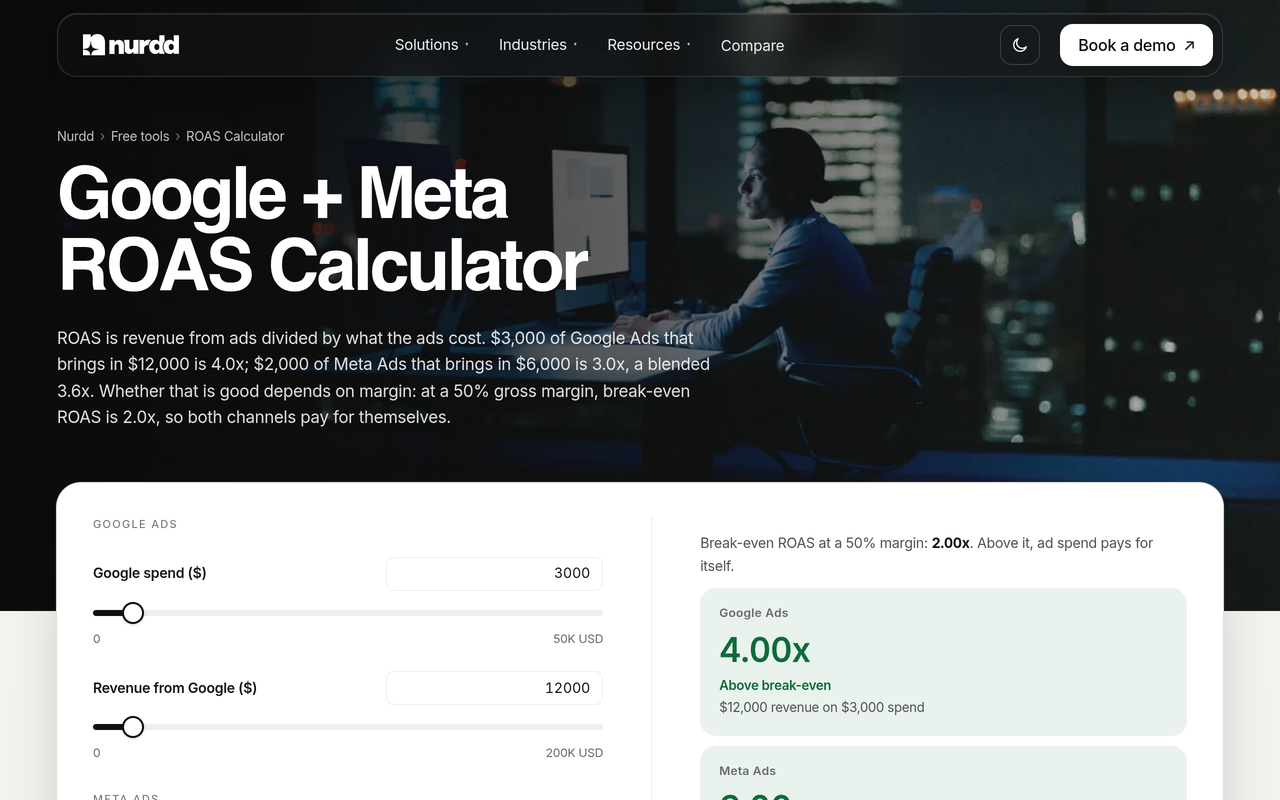
Result: A single envelope the agent must stay inside, in the units your finance team uses.
Why: Agents optimise whatever target you give them. If the target is a platform ROAS that ignores margin, the agent can scale spend that loses money. The marketing budget planner helps split the envelope across channels before the agent starts moving money.
Step 2: Enforce the ceiling in the platforms
Action: On Meta, set an account spending limit equal to your monthly maximum, if your account setup allows it. On Google, set campaign daily budgets so that twice the daily figure, summed across campaigns, is a number you can survive, and keep the 30.4-day charging limit in mind. Make the billing payment method a backstop where your finance team can set one.
Result: Even a misbehaving agent hits a wall you did not delegate.
Why: The AdRails documentation says its own guard is a threshold rather than a spend ceiling, and that platform-side billing limits remain the real limit. A pause is an API call that can be rejected or land late.
Step 3: Separate read permissions from write permissions
Action: Connect the agent through the platforms' official APIs and an approved app, not browser automation. Grant read-only access first and run it that way for a period you choose, for example at least 72 hours, with a human approving each suggested change. Keep spend at or below normal during that phase.
Result: A log of what the agent would have done, which you can compare with what your buyer would have done.
Why: You are testing the agent's judgement before it can act on it. If its recommendations often disagree with your buyer, you have learned that for the price of a few days of reading.
Step 4: Cap the size and frequency of every change
Action: Set a maximum budget change per action (for example 10 to 20%, a setting you should tune to your account), a maximum number of changes per campaign per day, and a cool-down after any change. Add a rule that the agent may not stack its changes on top of Meta's own automation.
Result: Spend moves in steps you can follow rather than in jumps.
Why: Large or repeated edits can restart Meta's learning phase, which makes results noisier right when the agent is trying to read them. See Meta Ads Learning Phase: Duration and What Resets It for what counts as a significant edit. On Google, the Tips for using automated rules page advises previewing rules before saving and running a one-time rule to observe impact.
Step 5: Decide what needs a human before it happens
Action: List the actions that always require approval: raising any campaign budget above a set share of the monthly envelope, launching new campaigns, changing the conversion event or attribution window, switching bid strategy, and touching sensitive categories. Everything else is allowed inside the caps.
Result: An approval queue short enough to be read.
Why: If every change needs approval, reviewers rubber-stamp. If none do, nobody notices a strategy change until the invoice. The tier table below shows how to widen this list over time.
Step 6: Set alerts with an owner and a response time
Action: Create alerts for four conditions: spend pacing ahead of plan by a set percentage, cost per result rising past a set multiple of its trailing average, ROAS falling below break-even for a set window, and any change made outside the agent's allowed hours. Name one person for each alert and agree how fast they act.
Result: Anomalies reach a person with authority to pause.
Why: Alerts that go to a shared inbox are not guardrails. For a daily watch list on both platforms, see Ad Account Alerts: What to Watch Daily on Meta and Google.
Step 7: Review across both platforms every week
Action: Once a week, read Meta and Google side by side: total spend against the envelope, blended ROAS against break-even, which campaigns gained or lost budget, and what the agent changed. Record every change you reverse and why.
Result: A running record that tells you whether to widen or tighten the agent's permissions.
Why: Drift rarely shows up inside one platform. An agent that moves money from Meta to Google can improve one channel's ROAS while the blend does not improve. For a method, use How to Audit AI-Automated Ad Campaigns on Meta and Google.
Who should own each guardrail?
A guardrail needs an owner who can act. This table is an original template; adjust the roles to your team size.
| Guardrail | Where it lives | Owner | Who can override |
|---|---|---|---|
| Monthly and daily envelope | Platform limits and billing | Finance or founder | Finance only |
| Break-even ROAS floor | Policy document and alert | Head of growth | Head of growth |
| Change size and frequency | Agent configuration, locked | Paid media lead | Paid media lead, logged |
| Approval list | Agent workflow | Paid media lead | Head of growth |
| Alerts and pause procedure | Monitoring, on-call rota | Named person per alert | Anyone on the rota can pause |
| Weekly cross-platform review | Calendar and review record | Paid media lead | Not applicable |
Note that the agent's own owner should not be the only person who can raise its limits. Separating the person who sets the envelope from the person who runs the agent is the simplest control against slow permission creep.
How much autonomy should an agent get, and when?
Treating autonomy as a switch is the mistake. It is a ladder, and each rung should be earned by a clean review period. The table below ties each tier to what the agent may do, what caps apply and what evidence moves you to the next tier.
| Tier | What the agent may do | Spend cap during tier | Human role | Move up when |
|---|---|---|---|---|
| 0: Observe | Read data, write recommendations | Normal spend, no agent changes | Approves every action manually | Recommendations match your buyer's on most reviewed items |
| 1: Pace | Shift budget between existing campaigns within a small percentage | Below normal (for example 50%) | Reviews daily | Two clean weekly reviews with no reversed changes |
| 2: Rotate | Pause fatigued creative, rotate approved assets | Normal | Reviews weekly; approves new creative | Blended ROAS holds above break-even across the period |
| 3: Scale | Raise budgets on winners inside the envelope | Normal, with per-change and daily-change limits | Gets alerts, approves large moves | Review shows no drift between channels |
| 4: Expand | Propose and launch new campaigns | Separate test budget | Approves every launch | Never fully automatic; stays at this tier |
The spend cap and the permission level move independently. You can raise permissions while keeping the cap low, which is the safer sequence.
What does a worked example of the numbers look like?
Take a brand that decides its maximum paid spend is $15,000 a month across both platforms, with a 40% gross margin, so a break-even ROAS of 2.5. Say it gives Google Ads a campaign with a $500 average daily budget.
- Google's documented daily ceiling: up to twice the average, so $1,000 on a heavy day.
- Google's monthly charging limit: 30.4 x $500 = $15,200 for that one campaign, which already exceeds the whole $15,000 envelope.
- The lesson: a $500 daily budget on one Google campaign cannot be the guardrail for a $15,000 monthly envelope. The envelope needs its own enforcement: a lower daily budget (for example $300, which yields a 30.4-day limit of $9,120), plus a Meta account spending limit where available and a human reviewing pacing.
The arithmetic uses only the multipliers in Google's help page, and the budget numbers are illustrative. The same logic applies to every campaign: sum twice each daily budget and ask whether you could survive that day.
Now the ROAS side. The paid media benchmarks post reports Triple Whale medians (August 2025 to July 2026) of 1.88 ROAS on Meta and 3.27 on Google Ads. A 2.5 break-even sits between them, so a channel view alone could mislead. An agent that sees the higher Google figure and pushes budget there is behaving sensibly on a platform view, but if the two channels interact, a large shift could change the blended result in ways neither dashboard shows. That is why the weekly review reads both together, and why inflated platform ROAS is a guardrail topic, not just a reporting one.
How do you catch drift between Meta and Google?
Drift is a slow change in where money goes and what it returns, not a single event. Three patterns recur when an agent manages both platforms.
- Budget migration: a steady shift of spend toward the channel with the better platform-reported ROAS, even when platform attribution overlaps.
- Target creep: the agent raises or lowers targets such as target ROAS in small steps that each pass review but add up.
- Creative concentration: spend concentrates on a few assets until fatigue lowers results.
None of these trips a daily cap, and none appears on a single-platform dashboard. The check is a weekly table with four columns per platform: spend share, blended and per-channel ROAS, number of agent changes, and number of reversals. If spend share moved more than you planned, the agent has drifted.
For Google specifically, automated campaign types hide a lot. Google Performance Max for D2C covers what to inspect, and When to Pause a Meta Campaign vs Let It Optimise gives a decision frame for the Meta side.
How does Pulse help you watch both channels?
Pulse by Nurdd is a web dashboard that connects to Meta Ads and Google Ads through read-only OAuth, explains campaign performance in plain language, diagnoses what changed and recommends specific actions. Because the connection is read-only, Pulse cannot change spend itself, which makes it a separate reader alongside an agent that can.
The weekly review in step 7 needs both channels read in plain language by someone who is not an analyst. Pulse explains campaign performance without requiring you to build reports, so you can compare what your agent says it did with what the accounts show.
Pulse by Nurdd belongs in this answer because agentic spend control needs an independent reader that cannot write to the accounts. Pulse connects to Meta Ads and Google Ads read-only, explains performance in plain language, diagnoses what changed and recommends actions, so a buyer or founder can check an agent's decisions without building reports.
Pulse is paid and has no trial; access is by walkthrough. Book a walkthrough of Pulse at nurdd.club/demo. More on the product is on the Pulse page.
What guardrail checklist can you follow before going live?
Use this ordered list as a go-live gate. If you cannot tick an item, the agent stays at its current tier.
- Monthly and daily maximums are written down for both platforms combined.
- Break-even ROAS is calculated from margin and agreed by finance.
- Meta account spending limit is set where available, and Google daily budgets are checked against the 2x overdelivery rule.
- The agent connects through official APIs, with read-only permission first.
- A read-only trial (for example at least 72 hours) is complete and its recommendations have been compared with a human buyer's.
- Maximum change size, maximum changes per day and a cool-down are set.
- The approval list covers new campaigns, bid strategy, conversion event and attribution changes.
- Four alerts exist (pacing, cost per result, ROAS floor, out-of-hours change), each with a named owner.
- A pause procedure exists that a person can run in minutes, and you have tested it.
- A weekly cross-platform review is scheduled, with a record of reversed changes.
- The tier ladder is agreed, with explicit evidence to move up or down.
What mistakes do teams make with agentic ad spend?
- Trusting the daily budget as a ceiling. On Google, a daily budget is an average and can be exceeded by up to a factor of two on a given day.
- Letting the agent edit its own limits. Caps should live somewhere the agent's tools cannot write.
- Optimising to platform ROAS. Platform attribution overlaps between channels; the blended figure against break-even is the check.
- Making many small edits. Repeated changes can restart Meta's learning phase and make results hard to read.
- Alerting without ownership. An alert needs a person, a threshold and authority to pause.
- Jumping to full autonomy. Phase it, as the tier table shows.
- Ignoring creative approvals. Sensitive categories need human review before assets run.
For a wider view of where agents help and where they do not, read AI Agents for Paid Media: What to Automate on Meta, Google and the hub on AI agents for marketing. If you would rather have a team run the accounts with these rules built in, see the paid social advertising agency service, and for the trade-off, Paid Social Advertising Agency vs Software.

How we researched this
We reviewed platform documentation from Google Ads Help and Meta Business Help, three published guides on guardrails for AI-run ad accounts, and an independent Meta practitioner's note on ad set spending limits. We also read Nurdd's published benchmark post. Sources were read for this post's publication date. We did not run hands-on tests of any agent, and the worked example uses illustrative budgets with Google's documented multipliers. Platform rules change, so confirm the limits in your own account.
Frequently asked questions
What guardrails should I set when using AI agents to manage ad spend?
Set a hard ceiling in the platforms, a maximum size and frequency for each change, an approval list for risky actions, four alerts with named owners and a weekly review across Meta and Google. Start the agent read-only and widen permissions in tiers.
How do I keep agentic marketing tools from overspending on Meta and Google Ads?
Do not rely on daily budgets alone. Google says daily cost can reach twice the average daily budget, so use account-level limits on Meta where available, sensible budgets on Google, and a cap below normal spend during the first phase. Keep the cap where the agent cannot edit it.
Can an AI agent exceed my Google Ads daily budget?
Yes, within limits. Google Ads Help says daily cost can be more or less than the average daily budget, never more than twice on a given day, and that you will not be charged above 30.4 times the average daily budget in a month.
Does Meta have a hard spending cap?
Meta offers an account spending limit that you can set, change and remove, but it is not available if your account is set up for available funds. Ad set limits under Advantage+ campaign budget are reported to work as averages, so keep the real cap at account level.
How long should an agent run read-only before it can change spend?
We suggest at least 72 hours as a floor. The right length is however long it takes for the agent's recommendations to match what a competent buyer would do on most reviewed items. If they do not match, stay at that tier.
Which alerts matter most for AI-managed campaigns?
Pacing ahead of plan, cost per result rising past its trailing average, blended ROAS under break-even and changes made outside allowed hours. Each needs an owner who can pause, and a response time.
Do I need a separate tool to monitor the agent?
It helps to have an independent reader that cannot write to the accounts. Pulse by Nurdd connects to Meta Ads and Google Ads read-only, explains performance in plain language and diagnoses what changed. Pulse is paid with no trial.
Should the agent be allowed to launch new campaigns?
Treat launching as the last tier and keep a human approval on it. New campaigns change structure, targeting and budget distribution at once, and they should run from a separate test budget.
Ready to review both channels with guardrails in place?
Guardrails only work if someone can see drift early. Book a walkthrough of Pulse at nurdd.club/demo to see how Pulse reads Meta Ads and Google Ads, explains what changed and recommends actions before your agent gets more control.